


Disruptive technology significantly alters the way industries and businesses function. It can force companies to embrace the digital sphere or stay behind.

This article aims to document a solution for String Encryption for iOS and macOS binaries. There are a few issues that arise and these are covered and mitigated as required. Two types of binary analysis are normally employed by hackers and reverse engineers, namely, static and dynamic analysis. String encryption falls under static analysis protection because it makes it challenging for attackers to inspect the application's sensitive string content such as backend services keys at rest.
Although the encryption scheme is arbitrary it would be beneficial to use a block cipher such as RC6, 3DES, AES, etc. This type of cipher is employed because it provides a one-to-one mapping with respect to byte buffer size whilst simultaneously satisfying the encryption requirement. This has an additional benefit in that it allows the application binary to maintain its current size after encrypting the strings at rest, it is also easier to map in and out of memory without the need to reallocate memory buffers of differing sizes.
This article won't delve into too much detail regarding the Mach-O binary file format — It is the native file format that contains, amongst other things, the application data and code to be executed on any Apple device (iPhone, iPad, MacBook, Apple Watch, etc.).

Figure 1 - The Mach-O Binary Sections
The important knowledge that is required for understanding the string encryption implementation in relation to the Mach-O binary is described below.
As indicated in Figure 1 the Mach-O binary is comprised of five distinct sections, namely, Header, Load Commands, __TEXT, __DATA, and __LINKEDIT sections. The section that is interesting for a first draft of the string encryption is the __TEXT section. Each section has a variable number of segments, the segment that contains the strings to be encrypted is found inside of the __TEXT section and is referred to as the __cstring segment. The __cstring segment contains all of the strings that are included in the application source code at the C, Objective-C and Swift level except for CFStrings which are stored inside of the __DATA section. It should be noted that the __cstring segment includes any strings inside of third party frameworks, static libraries or CocoaPods. This structure is visualised in Figure 2.
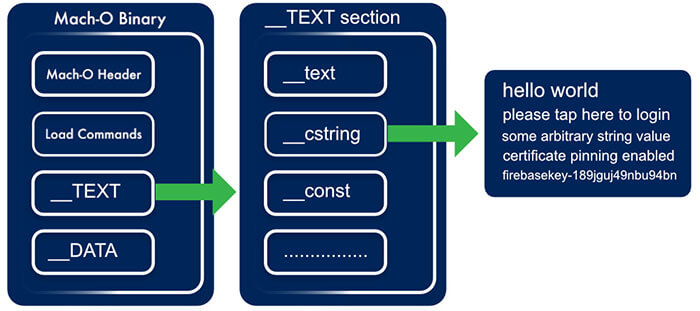
Figure 2 - The Mach-O Binary __cstring Segment
This concludes the overview and the description of each of the components and their purpose in facilitating String Encryption. What follows is two algorithms for String Encryption. The algorithms are comprised of two distinct phases, build and runtime. A source code implementation is provided for the second algorithm, as it is, in my opinion, superior, but the first is discussed and described.
Algorithm Overview, Mach-O String Encryption Variant #1
Build Time Overview
- Generate Mach-O segment to store the encryption key
- Encrypt Mach-O _cstring segment after the Mach-O binary is generated (using a simple post-build ruby script)
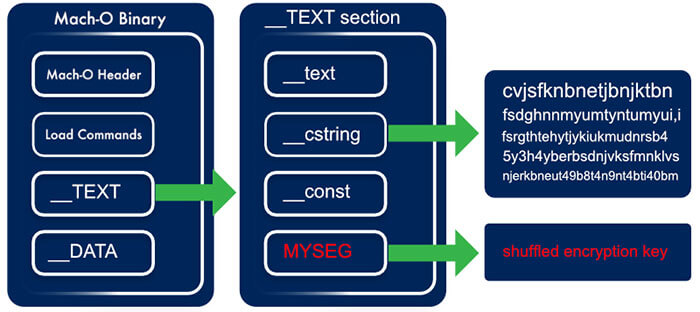
Figure 3 - The Mach-O Binary with new Segments and encrypted __cstring segment
Runtime Overview
- Obtain the __cstring segment memory block
- Obtain the __MYSEG encryption key segment memory block
- Update the memory blocks protection level (read/write)
- Encrypt the memory block using a block cipher encryption algorithm (e.g. AES)
- Update the memory blocks protection level (read-only, default)
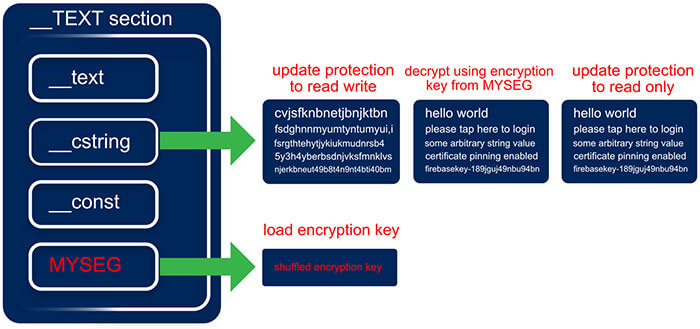
Figure 4 - The Mach-O Binary runtime decryption process
This solution works perfectly for simple projects but it does have a few caveats. Among others, we don't have real control over what's embedded in the __cstring segment. This has implications when other 3rd party libraries are trying to access this segment before it is decrypted at runtime. This is precisely the case when including 3rd party CocoaPods such as Firebase. Firebase is expecting certain strings to be available before the main application executes. One could try to ensure that the string decryption algorithm executes before the Firebase framework requires the strings but as one can imagine this could quickly become a tedious process especially if a number of frameworks or libraries are trying to access data from the __cstring segment. It also appears that when this segment is encrypted (leaving only the swift class names) Apple parses the binary and rejects it when it is submitted for AppStore review — though this is a problem for commercial applications this solution is still applicable in an enterprise application context so it is not completely useless.
What if string encryption is required for commercial applications? As noted above it is possible to create new Mach-O binary segments that can be queried at runtime. This is exactly what the second — and more flexible — algorithm does. This also has a cost that is incurred with respect to development time because a string loader will need to be implemented for both the c and Swift layer. The second algorithm is described below:
Algorithm Overview, Mach-O String Encryption Variant #2
Build Time Overview
- Generate Mach-O segment to store the encryption key
- Generate Mach-O segment to store the c layer strings
- Generate Mach-O segment to store the Swift layer strings
- Inject the encryption key into the keys segment
- Inject the encrypted strings into the c layer segment
- Inject the encrypted strings into the Swift segment

Figure 5 - The Mach-O __TEXT Section Layout With Custom Segments
Runtime Overview
- Obtain the encryption key from the keys segment memory block
- Obtain the c layer strings segment memory block
- Obtain the Swift layer strings segment memory block
- Update each of the memory blocks protection levels (read/write)
- Decrypt each of the memory blocks using a block cipher encryption algorithm (in the sample project provided its AES) using the key provided in the key section
- Update each of the memory blocks protection level (read-only, default)
- Load c strings into the c_string_store hash table class in c
- Load swift strings into the SecureStringStore class in Swift
Build Time Implementation
The first step would be to generate the raw strings JSON files, swift.json and c.txt. These JSON files need to follow a simple format and we will avoid any complex structures for the time being. A sample is shown below:
[ JSON]
{
	"some-application-secret":"my_super_secret_code",
	"album_leak_download_url":"https://leaks.com/unreleased/super_secret_album.zip",
	...
	...
	...
}
[ JSON]
These plaintext strings files need to be encrypted before they can be included inside of the binary. A simple key_obfuscator.rb is provided that transforms the keys for the Swift and C strings file into obfuscated strings as well as generating the StringsTable.swift and CStringTable.h. The cryptonology (this is an inside joke on the team I work on) tool accepts both the plaintext c.txt and swift.json files as input and produces the encrypted strings files as well as the key.txt file.
All the prerequisites are now complete for integrating the encrypted strings into the binary as custom Mach-O segments as depicted in Figure 5. A segment can be created inside of a section by adding an 'Other Linker Flags' command inside of the build settings of the main executable binary in Xcode. The sections are created inside of the __TEXT section to make them appear a bit more inconspicuous and they also get the standard __TEXT section protections applied to them at load time as an added bonus. The sections are created by adding the following to the 'Other Linker Flags' build setting.
[ CODE ]
-Wl,-sectcreate,__TEXT,__MS_SAUCE,StringsDemo/encrypted-strings/key.txt
-Wl,-sectcreate,__TEXT,__MS_SWIFT,StringsDemo/encrypted-strings/swift.json
-Wl,-sectcreate,__TEXT,__MS_C,StringsDemo/encrypted-strings/c.txt
[ CODE ]
It should be obvious what these commands do. They embed the contents of the encrypted files and key file generated by the cryptonology tool inside of the Mach-O binary.
The key_obfuscator.rb described above generates the StringTable.swift and CStringTable.h files. The StringTable.swift file contains a helpful enumeration with the obfuscated keys. The enumeration is used to provide a pleasant development experience to access the strings via the SecureStringStore.swift class but has the added benefit that none of these labels are leaked. When constructing the final application binary the enumeration case labels are not stored so we obtain pure obfuscated keys as a bonus. The CSecureStringStore.c is a simple hash table implementation that stores the strings used inside of the c layer. A simple Macro mapping header is generated, this is the CStringTable.h file. The strings are accessed using these macros. This provides end to end obfuscated secure string access at both the Swift and c layer. See Figure 6. for a sample of the obfuscated keys and the generated StringsTable.swift.
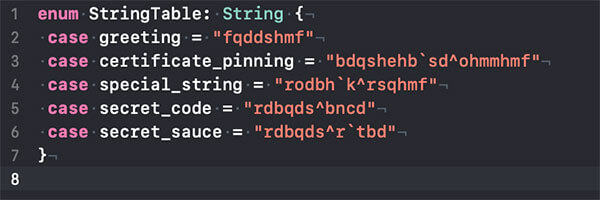
Figure 6 - [ The StringsTable.swift file - A sample]
Runtime Implementation
Three important concepts are very briefly explained in this section that are prerequisites to follow along with the runtime string loading implementation.
- Apple's DYLD (Dynamic Loader / Linker)
- Mach Memory APIs
- ASLR
Apple's DYLD
The dynamic linker is the second phase of the linking process that is invoked at runtime when loading a Mach-O application binary. It resolves load-time and run-time dependencies, and pieces together the necessary components, laying them out in memory and binding them together. DYLD also provides an API to inspect and trace its state.
Mach Memory API
The Mach Memory API provides an interface into the kernel memory to access memory regions via an abstraction layer. It is constructed atop a POSIX compliant UNIX memory API.
ASLR
ASLR (Address Space Layout Randomization) is a form of data security used to randomize data in memory to help prevent exploits from taking control of the application. It’s a slide offset value which ensures that each memory address loaded by the dynamic linker is shifted by the slide’s size. This dynamic slide value makes it challenging to carry out automated exploits.
Implementation
The c layer consists of a number of components. A lightweight c json library called jsmn (pronounced Jasmine) jsmn.h, a lightweight AES library (tinyAES), strings_core.h & strings_core.c, and c_string_store.h & c_string_store.c files.
The Swift layer contains an implementation of the SecureStringStore.swift which loads the sensitive decrypted strings via the c layer.
strings_core.h
The strings_core.h exposes a public method that loads the unencrypted strings, this method is invoked from a Swift SecureStringStore instance.
strings_core.c
The strings_core.c file can be broken down into a set of distinct algorithmic steps or phases. These are outlined as follows:
- Load DYLD Tracing & Inspection Symbols
- Obtain ASLR Slide and Mach Header Info
- Mechanism to obtain arbitrary sections and segments from the Mach-O binary
- Mechanism to query Mach Memory Protection Level
- Mechanism to alter Mach Memory Protection Level
- Mechanism to parse JSON at the c level
- Mechanism to decrypt memory at the c level
- A constructor attribute function to ensure that all of the above execute before the main application executes. This function decrypts the strings in memory once they are loaded by the dynamic linker. These unencrypted strings are then accessible via the c_string_store instance in c and SecureStringStore in Swift.
c_string_store.h
The c_string_store.h is a simple hash table implementation in c that exposes two methods; set and request. The former sets a value for a specific key and the latter returns a value for the key. The keys are generated as a Macro map to ensure that the keys are obfuscated at link time.
c_string_store.c
The CStringStore is a trivial implementation of a hash map that allows you to store up to 2048 strings. It would be trivial to extend this to reallocate the hash table when more string memory is required but this is left for future work.
SecureStringStore.swift
This class is a wrapper of a swift dictionary data structure that provides a mechanism to access the strings via the enumeration values of the generated SwiftStringTable.swift file and the ```string(for key: StringTableValue)``` method. The secure strings are loaded via the ```void fetch_string_buffer_information(uint8_t **address, uint8_t **size)``` method exposed in the strings_core.h class.
Auxiliary
C Symbol obfuscation is provided in the sample application but is beyond the scope of the article so it will not be discussed.
Future Work & Recommendations
- Localisation Support can also be added. Accessibility is becoming increasingly important in the current global landscape.
- Source code obfuscation would also be required to ensure that it would be difficult to figure out where the Swift classes that load the strings are located.
- The strings could easily be dumped at runtime because this implementation does not focus on any dynamic analysis mitigations such as memory region protections and anti-tampering.

In a world where the only constant is change, technology and all of its advancements can easily complicate or simplify a business or a product's journey. The digital world is rapidly merging into a monolithic machine where there is little difference between online and offline. Customers or users, an expert or a novice - we are constantly faced with problems that require new and clever solutions.
In this article, I will define, in my opinion, one of the most important aspects to any digital solution: The user experience (UX) and the gap that currently exists between the designing and developing of these experiences.
As developers, designers and engineers, we are tasked with solving these problems by building applications and systems that are simple to use, easy to access, with high performance and secure and scalable. As time goes by, there have been many different ways that teams and organisations have approached building applications, whether they be technically driven, design-focused or navigated by a workflow or methodology and framework.
Generally speaking, these applications consist of a few layers that its users sit on. Namely the User Interface (design), Front-end (development, or implementation of said design), Back-end (Server/API/Database/Logic Layer), and a layer of DevOps/Infrastructure. In essence all these layers are responsible for creating the User Experience, and in my opinion each layer or contributor has an important role to play in creating this tailored experience but in many cases the 'UX' is applied as its own layer and has its individual or team that takes responsibility for it, whether it be a UX designer, stakeholder, or product owner. This tends to create a gap and a divide between all the parties involved.
Note: I'm not a fan of 'slashing' roles, but to keep this to the length of an article and not a book, I am sinning by grouping the various back-end and DevOps layers with slashes.
So how can we bridge the gap between design and development?

"Everyone is a UX expert" – So let's make sure it’s everyone’s concern.
This quote is often delivered with a negative connotation. I disagree. Everyone is a UX expert in their own right. After all, we've all used, and abused applications for quite some time now. Let’s use this to our advantage and make sure everyone is considering the user experience.
No Handovers:
Wait, what? One of the advantages of a true agile workflow would generally mean that the UI Design, the UX design, the front-end development and the API all kick off at once. This may feel like an unproductive way of building software because naturally, one would think that there would be a bottleneck somewhere within the team.
How can the development start if there are no designs to work off? In that lies the beauty, with designers and developers (both front-end and back-end) being, for a lack of a better word, forced to work together. This way, the knowledge and creativity from developers and designers can be placed together to build working solutions every step of the way.
Rapid prototyping in the browser can be hugely beneficial as designers will be able to immediately provide feedback and vice versa. This creates shortened feedback loops, and shared knowledge that can help shape better solutions.
A designer’s skills should not be limited to Sketch or Photoshop. Yes, a picture tells a thousand words, but sometimes a great design simply needs words and communication to create a great "vision". API data structures and how or what the data should look like can be of huge benefit in the early stages of implementation. Of course, this is easier said than done, as there could be a disconnect between individuals. However, designers can also make use of realistic prototypes to provide developers with the application's look and feel, without spending too much time early on creating high fidelity mockups that may or may not be possible due to technical reasons, skills, budgets or time.
JSON structures can be provided early on through contracts to ensure less back and forth at a later stage. In my experience, while the world kept punting that designers should understand development, developers should also take the time to understand and respect designs. When we are at a level where we understand each other, it will be easier to build better solutions.
Communication and Collaboration
By working closely together, designers and developers learn to trust one another and pick up on each other’s language and points of view. Learning to compromise and respect one another's decisions allows for more overall input on the products we build. Remembering more questions early on can result in fewer hassles at a later stage.
Designers should take the time to explain their designs and the reasons behind them, allowing the developers to understand them better. In return when a developer explains the technical or time constraints to a particular design, it allows the designer the opportunity to think of an improved solution that may be better and less complex and time consuming to implement.
I've run into many scenarios where something that could have taken weeks to complete was resolved by simply changing text or the position of an element in a certain component. Think of it this way: If the entire team knows that we are tasked with creating a masterpiece - but we only have a pencil, it will ensure that everyone thinks of the best practical solution to spend their time improving and maximising the achievable gains rather than use imaginary colour crayons that aren't going to be available in the constraints of the project. It's a learning experience that will take time to get right, but once done, it'll only improve.
Make use of a 'User Experience' and 'Front-end' Architect:
As with any other titles in technology, the user experience and front-end architect is similar. There are many definitions of what they are expected to be. Are they designers or developers? Researchers or implementers? For the sake of this article, I am using the terms loosely.
Generally speaking, the user-facing functionality of an application is the responsibility of the front-end developer, who implements the designer’s vision and needs to be the voice between the back-end and the designers. The front-end developer's responsibilities have grown enormously over the years, and the skills that they need give them a wide range of understanding of design, data, structure, content and functionality. As applications become more complex, and technologies improve, we find that unicorns do exist.
With experience in the field comes domain knowledge. I believe that designers and developers with the right experience can position themselves perfectly to be the link between UI design, UI development, back-end, and ultimately the overall user experience. A combination of front-end and UX architect, in my opinion, would be beneficial in a large or small organisation where there is a disconnect between business requirements, technical implementation and visual design. As an example, when a solution architect is primarily focused on the technical complexity, and the lead product designer is primarily focused on the result. A middle layer between the two that understands both of their languages, point of views and concerns can be of benefit. Microservice design? What?
But with this set of 'unicorn' skills comes a certain amount of responsibility - preferably someone with this skill set should focus on the high-level overview of the application and contribute to the overall design, development and user experience of the application as this is where their skills would benefit the organisation most.
Rapid prototyping and quick iterations are always beneficial, but what if it's a large enterprise solution that is similar yet worlds apart? In the world of finance, for example, different products may seem very similar, but by paying attention to little details, and by taking the user's objectives into account, do we understand the complexity of the product?
The truth can be applied to eCommerce when someone understands the psychology and in-depth knowledge to grasp that small yet complex or simple changes can encourage a user to make a purchase. In this case, the need for an architect to oversee the technical infrastructure and the design system can be very useful. It allows for a pattern to be created, identifies limitations and complexities for multiple products or applications, while the designers and developers on the ground can focus on innovating and enhancing the base solution. The architect would focus on the foundation of the user interface designs of the application by implementing and making use of:
- Design systems
- Component library
- Build tools and infrastructure
- Security
- Integration
- High-level overview: i.e. as back-end developers usually follow the architect’s rough plan, the UX/Front-end architect would have a high-level viewpoint and blueprint for the visual component of the application
- 'Foreseeable unknowns'
- Soft skills
- Great communication and empathy for all stakeholders involved (Engineering, designers, product and business)

My take on the vertical split of UX/Front-end needs
“A little bit of this, a little bit of that, and maybe, just maybe we can create usable unicorns”
The Rise of the UX Engineer
But what if I need more unicorns? Well, the role may not be as mainstream or as popular as its well-known sibling, the full-stack developer. The need for a UX engineer has become extremely vital to organisations and teams of all sizes. Just as systems architects need an army of engineers to build out the blueprint, in the future so will a UX architect. With the increase in importance and focus on AI, machine learning, voice, conversation, chat and gesture inputs, users will soon be faced with new user interfaces that may or may not have physical touchpoints.
If anyone reading this remembers how different screen sizes and browsers (cough responsive design, cough mobile-first, cough) shook up software development and design (side note: it's more of a present tense than a past tense, as much as buzz words would like to move onto the next big thing), then the implications of the next wave of 'interfaces' is going to need a whole new approach and way of thinking. (See Design Thinking)
What is a UX Engineer?
Ah, more titles in an already title infested environment. Just kidding. Maybe it was all the JavaScript fatigue, 'back-endification' of the front-end, or maybe it has simply become something that is needed? In an industry where job descriptions for front-end developers range from Photoshop and Sketch skills to going to an interview and solving whiteboard algorithms, I do think it makes sense to split the skill set into what has been classified as a JavaScript engineer and a UX engineer. Yes, both still need a firm and strong understanding of HTML, CSS and JavaScript, but the differences arise in the finer details.
Apart from companies and teams needing to differentiate what skills they require, and for recruiting purposes, I firmly believe that the same individual that enjoys implementing the latest CSS or animation libraries may not have the same interest as someone wanting to solve JavaScript algorithms (and vice versa), and that is perfectly fine!
With that being said, a UX engineer should have the ability to turn the design language into a live, usable component library using vanilla JS/CSS or at least one popular framework or library - To implement the production-ready style guide for the design system, and create full-blown and rapid prototypes using the above-mentioned component library and design team.
The UX engineer should be able to easily communicate with designers and engineering teams and promote a healthy working partnership between the two. They should have a firm understanding of UX principles and how and when to do certain things. I'd argue that the need to be able to 'design' UI's in static or demo forms is neither here nor there as a UI can easily be designed in Sketch or the browser right away. It simply comes down to preference and tools:
- UX design skills
- UI design skills
- JavaScript frameworks
- CSS frameworks
- Basic build tooling
- Basic testing
- Design patterns
- Problem-solving
- Package managers
- Basic Node.js or understanding of one back-end language (understanding, not command or advanced knowledge)
- Be able to build products end to end
I've come across various definitions and explanations of a UX engineer, but I think the easiest way to make sense of it, is with a quick comparison. If a full-stack engineer is a front-end developer that has strong front-end development skills and back-end development skills, then a UX engineer is an individual with a strong understanding of UI design, UX design, and front-end development.
In time, I think that having the skills to communicate effectively with both designers and engineers will allow for the field to flourish, as this will encourage both designers and developers to step into new arenas, whilst bringing all their old skills from their current comfort zone. It's the perfect crossroads, giving each party a massive advantage for not only their role but for their company and future too - which in my mind is a win-win situation.

Ever wondered what UX/UI is or what it stands for? Even after you find out what it stands for you still ponder what it really is, what do you do, does it involve chasing people down and kindly harassing intel out of them?
You may be wondering who I am and what I do for a living for me to claim in the headline that everyone is a UX designer. My name is Freddie, a South African based UX/UI designer and I love the simple things in life (with an entire bottle of extreme served with it). I am a foodie, photographer, gamer, travel enthusiast, and did I mention foodie?
So onto the definition of UX/UI. The acronyms stand for user experience/user interface. Honestly speaking, the ‘/’ in-between UX/UI can make it a tad bit confusing. They are both user orientated but they are different. However, the two flow very well together hence the / makes them seem like they fought but don’t really want to leave each other.
User Experience aka UX is the understanding of peoples goals, motives, and conditions when performing a task.

https://www.researchgate.net/publication/ 220696314_Experience_Design_Technology _for_All_the_Right_Reasons
As you can see in the diagram above, the ‘self’ needs some kind of motive to perform a task. Within that task, there’s a goal you’re trying to achieve, but during that process, you might face obstacles that make performing or completing that task a bit challenging, making it difficult to reach your goal.
UX leans more towards research. It’s trying to understand who you’re building your product for, what those people are trying to achieve, and why are they trying to achieve this. Also what could possibly stop them from achieving what they want. The last thing you want is building something that only you understand and enjoy using when in actual fact you intended to build for a market.
Now, User Interface aka UI is a bit different from UX. UI is more visual orientated. As the saying goes ‘You eat with your eyes first’. If the food looks good, you are more inclined to want to eat it. How it appeals to the eye is important.
Ever sat through a lecture with 300 slides for 3–4 hours and all you just see is words, words, an endless sea of words. You eventually start hoping to see some images, pictures — anything to break the monotony of all the text. In today’s world, individuals are more prone to remembering content more effectively if it is visual or accompanied by a visual cue. This is the basis of UI.
The aim is to break down heavy content and make it look pleasing to the eye. There’s a number of ways to achieve this by using elements of design and your knowledge of different mediums. This is not only limited to digital products but expands to fashion, interior, culinary, and to even the most ordinary objects/products/services we use every day.
First impressions are everlasting right?


The Grand Tour (Amazon Prime Series)
Right now you’re probably asking “That’s all well and good, but how am I a UX designer again?”
UX is not just some fancy term made up for designers. Okay, maybe the word User Experience but the concept of understanding people has been there longer than we know. Think of UX as being a psychologist of design, essentially you’re trying to get into your consumers/users head to better understand their thinking.
One thing a lot of people don’t know is that they have some sort of UX knowledge which they don’t essentially call UX. Take musicians/producers, for instance, I listen to EDM and the best DJs travel the globe providing an amazing experience to people through music.
Now call me a noob for asking this but who on earth would pay for something they can listen to on their mobile device or stream on YouTube? The whole idea behind music concerts is to provide that amazing UX. The thrill of having to go through the process of buying your ticket online, waiting till the day, and partying till the midnight rain. Now DJs/producers/musicians don’t really call this UX.

In the music world, it’s well known as euphoria. The whole idea is to provide a pleasurable experience to individuals, such as that heavenly feeling you get when you sink your teeth into the most glorious dish you’ve ever tasted. We all have something that makes us crumble and say, ‘Now that was amazing’.
No Youtube video or a downloaded song can match the experience you get when you’re within that crowd and your favourite Dj is playing your jam and all the right things are coming together and you’re just like ‘damn’.
Right now I'm listening to the soundtrack of Blade Runner 2094 ‘Mesa’ and I must say, film producers and sound engineers really know how to captivate people.
Everything we do in our everyday lives, the products and services we interact with all have components of UX. Someone/people out there took the time to sit and think, ‘What will make achieving that goal that much easier?’.
Let’s be honest, if you had a goal and two choices in completing that goal, the easier route, and the harder route, any sane person will pick the easier route. (Unless you’re me, then you’d create your own third choice from thin air and make people gasp and wonder whether you’re the root of craziness or if you’re conjuring up sorcery.)
The experience you give to one is everlasting whether through a product or service. The idea behind it is to gain trust with your consumers/clients. For a cook, it will be through his/her food, a lawyer, through their reputation of won cases, an architect, through their grand structural designs. As for me, well, I love sharing what I do best. Design, culture, food, and photography.
So ask yourself, after reading this, are you a UX designer? I’d love to hear your thoughts.

The most effective software development teams utilise collaboration and other best practices of agile software development. Learn more here.

Our working and social environments are constantly changing. Did you know that in the late 19th century, the patent office had announced that everything that could be invented by then, had been invented? While inventions are still happening, one of the most significant impacts on the technological world is probably disruptive technology. Uber’s thrust into the market in 2011, is a prominent example of disruptive technology where no new technology was developed, but rather ingenious use of existing technologies.
Needless to say, there’s been much hype and focus, in very recent years, as to:
- How digitally-ready we are
- Finding new and improved ways of delivering solutions and
- Our responsiveness to external change.
Change is no longer a periodic planned event, but rather an inherent grain of our lives. Some of the recent, quite significant change events that would not have been perceivable a decade ago, are a mixed-race royal superstar now the duchess of Sussex, a corporate mogul running a 1st world country and even a relaxed dress code and self-managed leave at a leading local investment house.
So, while radical changes in the world are being embraced, my view is that our working environments are slowly shaping in preparing for its future-fit landscape. How has the working environment and even our learning institutions evolved? How ready are they to accommodate current and future generations, specifically about influencing the culture of work/learning environments and non-technical competencies?
Before I get to how ready I think we are, I’d like to explore the opportunities presented in our current and future generational gaps. Chip Conley, in his Ted Talk, speaks about “intergenerational pipelines of wisdom” as referring to the changing physics of wisdom, as multi-directional in its flow. Chip also speaks about knowledge now being viewed as wisdom. Following on from this, Chip’s philosophy presents an interesting shift in thinking, especially in the workplace in that, seasoned1 workers would bring wise eyes and less seasoned workers, fresh eyes to the knowledge pool.
As a ‘fresh eyes’ contributor to the knowledge pool myself, I am fortunate to be working for and working with one of South Africa’s leading software solutions and services company. I am afforded diverse opportunities, which can be interpreted as their appreciation – probably unwittingly – of intergenerational pipelines of wisdom. Our relationship and, ultimately the relationship with our customers, is a multi-directional flow of knowledge and value add.
How ready are working and learning environments to facilitate this concept of wisdom flowing in both directions across multi-generations? According to a 2016 Forbes article, there are 9 guidelines to help organisations facilitate a learning- or influence a sought-after work culture:
- Provide opportunities for learning and development
- Offer work-life balance
- Money is not everything
- Make way for movement
- Be mentors, not bosses
- Create a strong company culture
- Recognise the need for recognition
- Take the good with the bad
- Don’t disconnect the digital narratives
As I unpack 2 of these guidelines, by reflecting on my journey and experiences, I draw a correlation to these guidelines as already entrenched in my company’s values; safe to fail - quick to grow and learn, work-life balance and servant leadership.
Be mentors2, not bosses
The desire to instruct, dictate or impart knowledge more often than not, is a natural go-to for most. I equate the relationship between mentor and mentee3 as a similar relationship between the child and parent figure in that, the child possesses some or all of the parent’s capabilities. The latter is only, however, achieved with persistent guidance by the parent over time. Both actors in this scenario are learning; the child learns to trust the parent figure and the parent figure learns to exercise patience. The correlation in the working environment is similar in that, the mentee, based on a pre-existing recruitment process, has the technical potential of the mentor. The process requires time and commitment by both roles and their learning experiences are similar to that of the child and parent.
Provide opportunities for learning and development
Like in the gaming world scenario, each game level is designed to progressively stretch and challenge the gamer. So too, should the opportunities to grow and learn for individuals (seasoned or not) in the working environment. In the mentor/mentee relationship, the seasoned mentor should exercise introspection to his/her limitations and be bold to acknowledge when the mentee should explore development within another mentor/mentee relationship. So when the gamer reaches the top-level (essentially ‘clocked-the-game’), the gamer moves on to another more or differently skilled gaming challenge. The skills from the initial game are maintained and transferrable to the new and improved game.
What is interesting about Forbes’ guidelines, is that they are not focused on the next big technological buzz or technical learning, but rather on building relationships and transferring wisdom. If we include Chip Conley’s view on wisdom, it’s transferring wisdom multi-directionally, so that we are all continuously adding to our toolbox. Further supporting my view that the future-fit preparation is being made in the right direction, my company has an established academy making their impact with soft skills workshops in its training basket.
In summary, my philosophy about how we prepare ourselves for a rapidly changing environment or economy is to find a purpose that is beyond realizing value or benefits of teaching and learning in the short-term or for oneself. The idea about creating value and ultimately making an impact, is potentially only realized by future generations, may be argued as an altruistic and somewhat idealistic philosophy, but one worth believing in and striving towards. So, does it matter which technical role we currently fulfil in the working environment? Probably not. But what does matter, is a need for a multi-dimension thinking and learning approach that will contribute to a future-fit world, which is adequately prepared for almost any unpredictable and disruptive nature of change. In essence, creating transferrable wisdom that is authentically future-fit regardless of where change takes us, therein creating a paying-it-forward and sustaining learning ethos.
So go forth and teach, mentor or coach, in a way you wish you received it and learn like an inquisitive child, fearlessly and boldly!
1. People who are deemed to have more experience in their particular field of expertise.
2. An experienced or trusted person training/guiding a less-experienced person. Coach & mentor used interchangeably.
3. A person/s being mentored.

Software is inherently complex. This article serves as a reminder of the importance of simplicity in the modern software development workspace.

Effective software review drives software design success and teamwork. Learn how strategic reviews and servant leadership impact tech development.

While most software development teams and companies have predominantly adopted the implementation of the Agile methodology in their approach to software development, there may be a few that may still be stuck in the past with the waterfall approach, the proverbial equivalent of living in a deserted island, unless of course they are trying to walk on water.